
 Atlas FieldOps
Capture
Mobile/Web/Import
Platform
Atlas FieldOps turns operational work into a connected data flow: configure the project context, build mobile-ready forms, collect offline, approve evidence, clean data, and report with confidence.
Workflow
Every record follows the same governed path: build the form, assign a field officer, collect offline, route to supervisor review, and finalize with an approval.
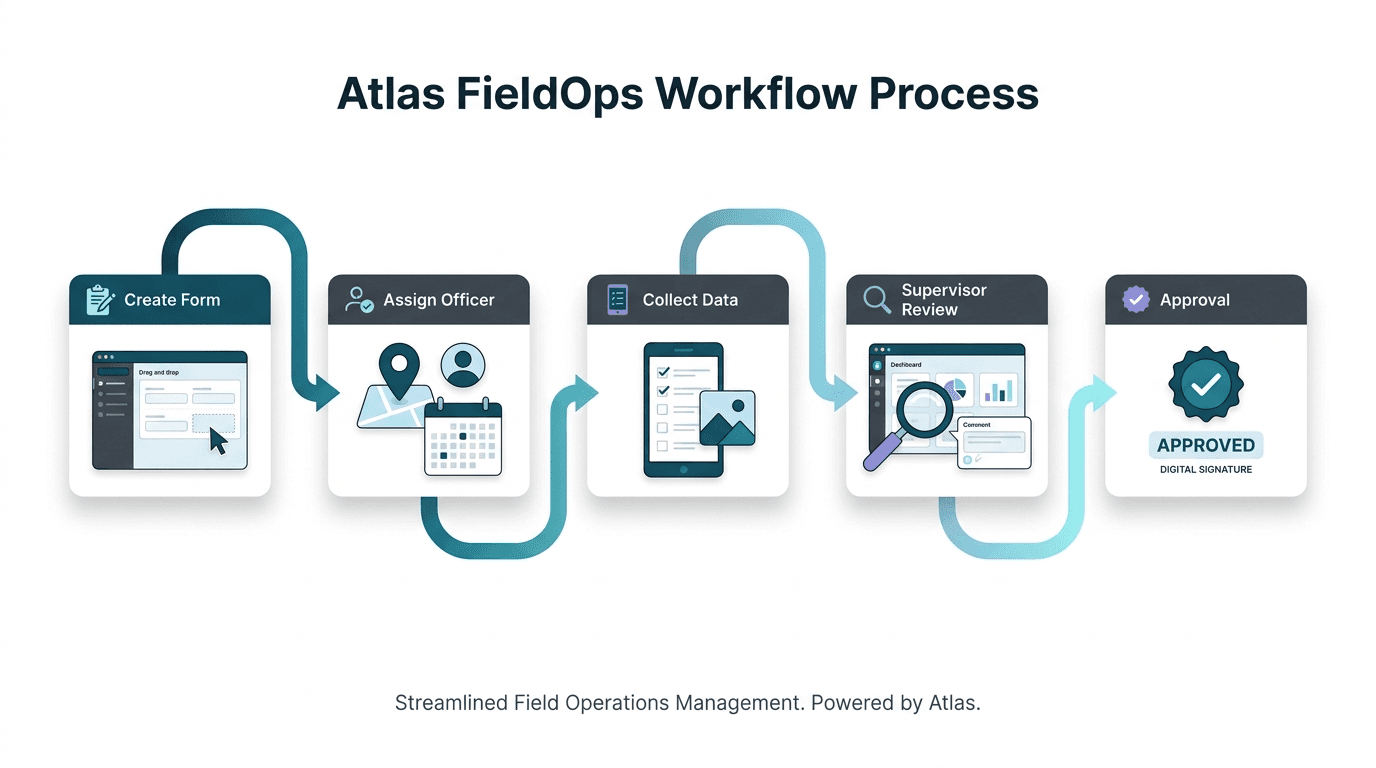
How the platform works
Atlas FieldOps is built around the way field organizations actually work: configure the context, collect evidence, review it, and turn approved data into action.
Choose a sector pack or custom setup, define projects, locations, teams, entities, KPIs, approval rules, and reporting needs.
Create forms for surveys, inspections, stock counts, registrations, delivery proof, audits, training, complaints, or custom workflows.
Send the right forms, entities, locations, boundaries, and instructions to field officers, supervisors, stores, routes, facilities, or assets.
Capture responses, GPS, timestamps, photos, signatures, files, barcodes, linked records, and draft work even when connectivity is weak.
Run approvals, corrections, duplicate checks, GPS validation, spreadsheet-style cleaning, data quality review, and audit logging.
Approved data updates entities, maps, dashboards, KPIs, reports, exports, supervisor queues, and management decisions.
Architecture
Every record keeps its organization, project, entity, form version, user, location, review state, and audit trail so data can move safely from mobile capture to dashboards and reports.
Multi-tenant
Tenant isolation
Offline-ready
Mobile sync
Governed
Audit history
Tenant, users, roles, branding, security, plans, and audit policy.
Sector context, geography, entity categories, teams, forms, KPIs, and governance.
People, households, facilities, products, stores, assets, cases, routes, or custom records.
Mobile-ready surveys, inspections, audits, inventory checks, registrations, and follow-ups.
Every record keeps tenant, project, entity, form version, location, user, status, and audit context.
Field, web, uploaded, imported, returned, corrected, approved, or rejected records.
Validation, duplicates, GPS checks, missing data, outliers, conflicts, and reconciliation.
Maps, metrics, dashboards, reports, exports, donor/client views, and management actions.
Data use
A visitor should understand immediately: raw data is captured first, then reviewed and cleaned, then promoted into official records, dashboards, maps, KPIs, and reports.
Mobile/Web/Import
Approve/Return/Clean
Entities/KPIs/Maps
Reports/Dashboards/Exports
Final result: trusted operational intelligence
Approved submissions update entity profiles, quality dashboards, GIS layers, KPI progress, supervisor queues, reports, and governed exports.
Ready for field operations
See how Atlas FieldOps can support your field teams, sector workflows, entity operations, geospatial intelligence, KPI tracking, and governed reporting.